A modular monolith is a single deployable app with well-defined modules that communicate through explicit interfaces, not by reaching into each other’s internals. Combines monolith simplicity (single deploy, no network calls) with microservice organization (clear boundaries, team autonomy). Shopify and GitHub use this. Easy to extract modules to services later.
Microservices aren’t always the answer. For most teams, they bring network latency, distributed debugging nightmares, and operational overhead that outweighs the benefits. But a tangled monolith where everything depends on everything isn’t great either.
There’s a middle ground: the modular monolith. Clear boundaries and team autonomy without the distributed systems tax. It’s how Shopify handles billions in Black Friday sales with a single deployable application—and why companies like Basecamp and GitHub chose this path too.
What is a Modular Monolith?
A modular monolith is a single deployable application that’s internally divided into well-defined modules. Each module owns its domain, has clear boundaries, and communicates with other modules through explicit interfaces.
Think of it like an apartment building:
- Traditional monolith: One giant open floor plan. Everyone shares everything. Chaos.
- Microservices: Separate houses scattered across the city. Complete isolation but expensive travel.
- Modular monolith: Apartments in a building. Private spaces with shared infrastructure.
Traditional Monolith — Everything in one place, no boundaries:
flowchart LR
    subgraph Traditional["Traditional Monolith"]
        UI[User Interface] --> BL[Business Logic]
        BL --> DAL[Data Access]
        DAL --> DB[(Database)]

        UI --> Utils[Shared Utilities]
        BL --> Utils
        DAL --> Utils

        UI -.->|"Direct Access"| DAL
        BL -.->|"Reaches into everything"| DB
    end

    style Traditional fill:#fff8e1,stroke:#f57f17,stroke-width:2px
    style DB fill:#ffcdd2,stroke:#c62828
    style Utils fill:#ffcdd2,stroke:#c62828
Modular Monolith — Clear boundaries, shared infrastructure:
flowchart TB
    subgraph Modular["Modular Monolith - Single Deployment"]
        subgraph Orders["fa:fa-box Orders Module"]
            O_API[Public API]
            O_Logic[Order Logic]
            O_Data[Order Data]
            O_API --> O_Logic --> O_Data
        end

        subgraph Payments["fa:fa-credit-card Payments Module"]
            P_API[Public API]
            P_Logic[Payment Logic]
            P_Data[Payment Data]
            P_API --> P_Logic --> P_Data
        end

        subgraph Inventory["fa:fa-warehouse Inventory Module"]
            I_API[Public API]
            I_Logic[Inventory Logic]
            I_Data[Inventory Data]
            I_API --> I_Logic --> I_Data
        end

        SharedDB[(Shared Database)]

        O_Data --> SharedDB
        P_Data --> SharedDB
        I_Data --> SharedDB

        O_API -.->|"Through API only"| P_API
        O_API -.->|"Through API only"| I_API
    end

    style Modular fill:#e8f5e9,stroke:#2e7d32,stroke-width:2px
    style Orders fill:#c8e6c9,stroke:#388e3c
    style Payments fill:#c8e6c9,stroke:#388e3c
    style Inventory fill:#c8e6c9,stroke:#388e3c
    style SharedDB fill:#bbdefb,stroke:#1565c0,stroke-width:2px
Microservices — Complete isolation, network overhead:
flowchart TB
    subgraph Microservices["Microservices - Separate Deployments"]
        subgraph OS["Order Service"]
            OS_API[API]
            OS_Logic[Logic]
        end
        OS_DB[(Order DB)]

        subgraph PS["Payment Service"]
            PS_API[API]
            PS_Logic[Logic]
        end
        PS_DB[(Payment DB)]

        subgraph IS["Inventory Service"]
            IS_API[API]
            IS_Logic[Logic]
        end
        IS_DB[(Inventory DB)]

        OS_Logic --> OS_DB
        PS_Logic --> PS_DB
        IS_Logic --> IS_DB

        OS_API <-.->|"Network Call"| PS_API
        OS_API <-.->|"Network Call"| IS_API
        PS_API <-.->|"Network Call"| IS_API
    end

    style Microservices fill:#e3f2fd,stroke:#1565c0,stroke-width:2px
    style OS fill:#bbdefb,stroke:#1976d2
    style PS fill:#bbdefb,stroke:#1976d2
    style IS fill:#bbdefb,stroke:#1976d2
    style OS_DB fill:#e1bee7,stroke:#7b1fa2
    style PS_DB fill:#e1bee7,stroke:#7b1fa2
    style IS_DB fill:#e1bee7,stroke:#7b1fa2
The key difference from a traditional monolith: enforced boundaries. Code in the Orders module can’t just reach into Payments and grab whatever data it wants. It has to go through a defined interface.
Why Not Just Use Microservices?
Microservices solve real problems. When you have hundreds of developers, you need autonomous teams. When you need to scale specific components independently, microservices make sense.
But they come with a tax:
| Microservices Tax | Cost |
|---|---|
| Network latency | Every call adds 1-10ms |
| Partial failures | What happens when one service is down? |
| Data consistency | No more ACID transactions across services |
| Operational complexity | Kubernetes, service mesh, distributed tracing |
| Developer experience | Running 10 services locally is painful |
| Debugging | Good luck tracing a request across 8 services |
For a team of 5-50 developers, this tax often outweighs the benefits.
The distributed monolith trap: Many teams end up with tightly coupled services that have to be deployed together. They have all the complexity of microservices with none of the independence. This is worse than a well-structured monolith.
flowchart LR
    subgraph "Distributed Monolith - Worst of Both Worlds"
        A[Service A] -->|Sync Call| B[Service B]
        B -->|Sync Call| C[Service C]
        C -->|Sync Call| D[Service D]
        D -->|Sync Call| A
    end

    style A fill:#ffcdd2
    style B fill:#ffcdd2
    style C fill:#ffcdd2
    style D fill:#ffcdd2
The Modular Monolith Sweet Spot
A modular monolith gives you:
What you keep from monoliths:
- Single deployment
- Simple local development
- ACID transactions when you need them
- No network overhead between modules
- Easy debugging with standard tools
What you gain from microservices thinking:
- Clear module boundaries
- Team autonomy within modules
- Prepared for future extraction
- Independent testing per module
- Domain-driven organization
Let me show you what this looks like in practice.
Anatomy of a Modular Monolith
Module Structure
Each module is a mini-application with its own layers:
graph TB
    subgraph "Order Module"
        direction TB
        API[Public API / Facade]
        App[Application Services]
        Domain[Domain Logic]
        Infra[Infrastructure]
        Data[(Module Data)]

        API --> App
        App --> Domain
        Domain --> Infra
        Infra --> Data
    end

    External[Other Modules] -->|Only through API| API

    style API fill:#c8e6c9
    style External fill:#e3f2fd
The rules:
- Public API: The only way other modules can interact with this module
- Application Services: Orchestrate use cases
- Domain Logic: Business rules, pure code, no dependencies
- Infrastructure: Database access, external services
- Module Data: Tables owned exclusively by this module
Folder Structure
Here’s what a modular monolith looks like in code:
1
2
3
4
5
6
7
8
9
10
11
12
13
14
15
16
17
18
19
20
21
22
23
24
25
26
27
28
29
30
31
src/
├── modules/
│   ├── orders/
│   │   ├── api/
│   │   │   └── OrderFacade.java       # Public interface
│   │   ├── application/
│   │   │   └── OrderService.java
│   │   ├── domain/
│   │   │   ├── Order.java
│   │   │   └── OrderRepository.java   # Interface
│   │   └── infrastructure/
│   │       └── JpaOrderRepository.java
│   │
│   ├── payments/
│   │   ├── api/
│   │   │   └── PaymentFacade.java
│   │   ├── application/
│   │   ├── domain/
│   │   └── infrastructure/
│   │
│   └── inventory/
│       ├── api/
│       ├── application/
│       ├── domain/
│       └── infrastructure/
│
├── shared/                             # Shared kernel (keep it small)
│   ├── Money.java
│   └── EventPublisher.java
│
└── Application.java
Each module lives in its own package. The api folder contains the only classes that other modules can access.
Enforcing Boundaries
The hardest part of a modular monolith is keeping modules separate. Without enforcement, developers will take shortcuts, and you’ll end up with a mess.
Option 1: Package-level access (Java)
1
2
3
4
5
6
7
8
9
10
11
// In orders module - package-private by default
class Order {
    // Only accessible within orders module
}

// Public facade - the only entry point
public class OrderFacade {
    public OrderDto getOrder(Long id) {
        // ...
    }
}
Option 2: Architecture tests with ArchUnit
1
2
3
4
5
6
7
8
9
10
11
12
@AnalyzeClasses(packages = "com.myapp")
public class ModuleBoundaryTests {

    @ArchTest
    static final ArchRule orders_should_not_access_payment_internals =
        noClasses()
            .that().resideInAPackage("..orders..")
            .should().accessClassesThat()
            .resideInAPackage("..payments.domain..")
            .orShould().accessClassesThat()
            .resideInAPackage("..payments.infrastructure..");
}
This test fails the build if someone violates module boundaries.
Option 3: Separate build modules
1
2
3
4
5
6
7
8
9
10
11
12
13
// build.gradle
project(':orders') {
    dependencies {
        implementation project(':shared')
        // Cannot depend on other modules directly
    }
}

project(':payments') {
    dependencies {
        implementation project(':shared')
    }
}
Each module is a separate Gradle/Maven module. The compiler enforces boundaries.
Module Communication Patterns
Modules need to talk to each other. Here’s how to do it right.
Pattern 1: Synchronous Calls Through Facades
The simplest approach. Module A calls Module B’s public API.
1
2
3
4
5
6
7
8
9
10
11
12
13
14
15
16
17
18
19
20
21
22
23
24
25
26
// In OrderService
public class OrderService {
    private final InventoryFacade inventoryFacade;
    private final PaymentFacade paymentFacade;

    public Order createOrder(CreateOrderRequest request) {
        // Check inventory
        boolean available = inventoryFacade.checkAvailability(
            request.getProductId(),
            request.getQuantity()
        );

        if (!available) {
            throw new InsufficientInventoryException();
        }

        // Create order
        Order order = new Order(request);
        orderRepository.save(order);

        // Reserve inventory
        inventoryFacade.reserve(order.getId(), request.getProductId());

        return order;
    }
}
sequenceDiagram
    participant Client
    participant OrderFacade
    participant OrderService
    participant InventoryFacade
    participant PaymentFacade

    Client->>OrderFacade: createOrder()
    OrderFacade->>OrderService: createOrder()
    OrderService->>InventoryFacade: checkAvailability()
    InventoryFacade-->>OrderService: true
    OrderService->>OrderService: save order
    OrderService->>InventoryFacade: reserve()
    OrderService-->>OrderFacade: Order
    OrderFacade-->>Client: OrderDto
Pros:
- Simple to understand
- Easy to debug
- Transaction support
Cons:
- Creates coupling between modules
- Synchronous means waiting
Pattern 2: Domain Events
Modules communicate through events. When something happens in Module A, it publishes an event. Module B subscribes and reacts.
1
2
3
4
5
6
7
8
9
10
11
12
13
14
15
16
17
18
19
// In Orders module
public class Order {
    public void complete() {
        this.status = Status.COMPLETED;
        // Publish event
        DomainEvents.publish(new OrderCompletedEvent(this.id, this.items));
    }
}

// In Inventory module
@EventListener
public class InventoryEventHandler {
    public void handle(OrderCompletedEvent event) {
        // Reduce inventory for each item
        event.getItems().forEach(item ->
            inventoryService.reduce(item.getProductId(), item.getQuantity())
        );
    }
}
sequenceDiagram
    participant Order
    participant EventBus
    participant Inventory
    participant Notification

    Order->>Order: complete()
    Order->>EventBus: publish(OrderCompleted)

    par Parallel handlers
        EventBus->>Inventory: handle(OrderCompleted)
        Inventory->>Inventory: reduce stock
    and
        EventBus->>Notification: handle(OrderCompleted)
        Notification->>Notification: send email
    end
Pros:
- Loose coupling
- Easy to add new subscribers
- Modules don’t need to know about each other
Cons:
- Harder to debug (who’s handling this event?)
- Eventually consistent
- Event ordering can be tricky
Pattern 3: Shared Data Through Views
Sometimes modules need to read (but not write) each other’s data. Instead of direct database access, expose read-only views.
1
2
3
4
5
6
7
8
9
10
11
12
13
14
15
// Orders module exposes a read model
public interface OrderReadModel {
    List<OrderSummary> getOrdersForCustomer(Long customerId);
    OrderSummary getOrderSummary(Long orderId);
}

// Payments module uses it
public class PaymentService {
    private final OrderReadModel orderReadModel;

    public void processRefund(Long orderId) {
        OrderSummary order = orderReadModel.getOrderSummary(orderId);
        // Process refund based on order amount
    }
}
This is similar to how CQRS separates reads and writes. The read model is optimized for queries and doesn’t expose internal domain logic.
Database Strategy: To Share or Not to Share
One of the biggest decisions: how do modules access data?
Option 1: Shared Database, Separate Schemas
All modules use the same database but own different tables.
graph TB
    subgraph "Application"
        Orders[Orders Module]
        Payments[Payments Module]
        Inventory[Inventory Module]
    end

    subgraph "Database"
        subgraph "orders schema"
            OT1[orders]
            OT2[order_items]
        end
        subgraph "payments schema"
            PT1[payments]
            PT2[refunds]
        end
        subgraph "inventory schema"
            IT1[products]
            IT2[stock_levels]
        end
    end

    Orders --> OT1
    Orders --> OT2
    Payments --> PT1
    Payments --> PT2
    Inventory --> IT1
    Inventory --> IT2

    style OT1 fill:#e3f2fd
    style OT2 fill:#e3f2fd
    style PT1 fill:#c8e6c9
    style PT2 fill:#c8e6c9
    style IT1 fill:#fff3e0
    style IT2 fill:#fff3e0
Rules:
- Module X can only query tables in schema X
- No foreign keys across schemas
- If you need data from another module, call its API
1
2
3
4
5
6
7
8
// WRONG: Direct cross-schema query
SELECT o.*, p.*
FROM orders.orders o
JOIN payments.payments p ON o.id = p.order_id

// RIGHT: Call through facade
Order order = orderFacade.getOrder(orderId);
Payment payment = paymentFacade.getPaymentForOrder(orderId);
Pros:
- Simple transactions within a module
- Easy to extract modules later (just move the schema)
- Works with existing ORMs
Cons:
- Requires discipline to not cross schemas
- Shared database is a single point of failure
Option 2: Logical Separation in Same Schema
For smaller applications, you might use the same schema but prefix tables.
1
2
3
4
5
6
7
8
9
10
11
12
-- Orders module owns these
orders_orders
orders_order_items
orders_order_history

-- Payments module owns these
payments_payments
payments_refunds

-- Inventory module owns these
inventory_products
inventory_stock_levels
Same rules apply: never query tables you don’t own.
Option 3: Separate Databases Per Module
Each module has its own database. This is closest to microservices but still a single deployment.
graph TB
    subgraph "Application - Single Deployment"
        Orders[Orders Module]
        Payments[Payments Module]
        Inventory[Inventory Module]
    end

    Orders --> DB1[(Orders DB)]
    Payments --> DB2[(Payments DB)]
    Inventory --> DB3[(Inventory DB)]

    style DB1 fill:#e3f2fd
    style DB2 fill:#c8e6c9
    style DB3 fill:#fff3e0
Pros:
- Complete data isolation
- Can use different database types per module
- Easiest path to microservices
Cons:
- No cross-module transactions
- More complex local development
- Higher operational overhead
Real World Example: E-commerce Platform
Let’s design an e-commerce system as a modular monolith.
Identifying Modules
Start by identifying bounded contexts (DDD term for cohesive business areas):
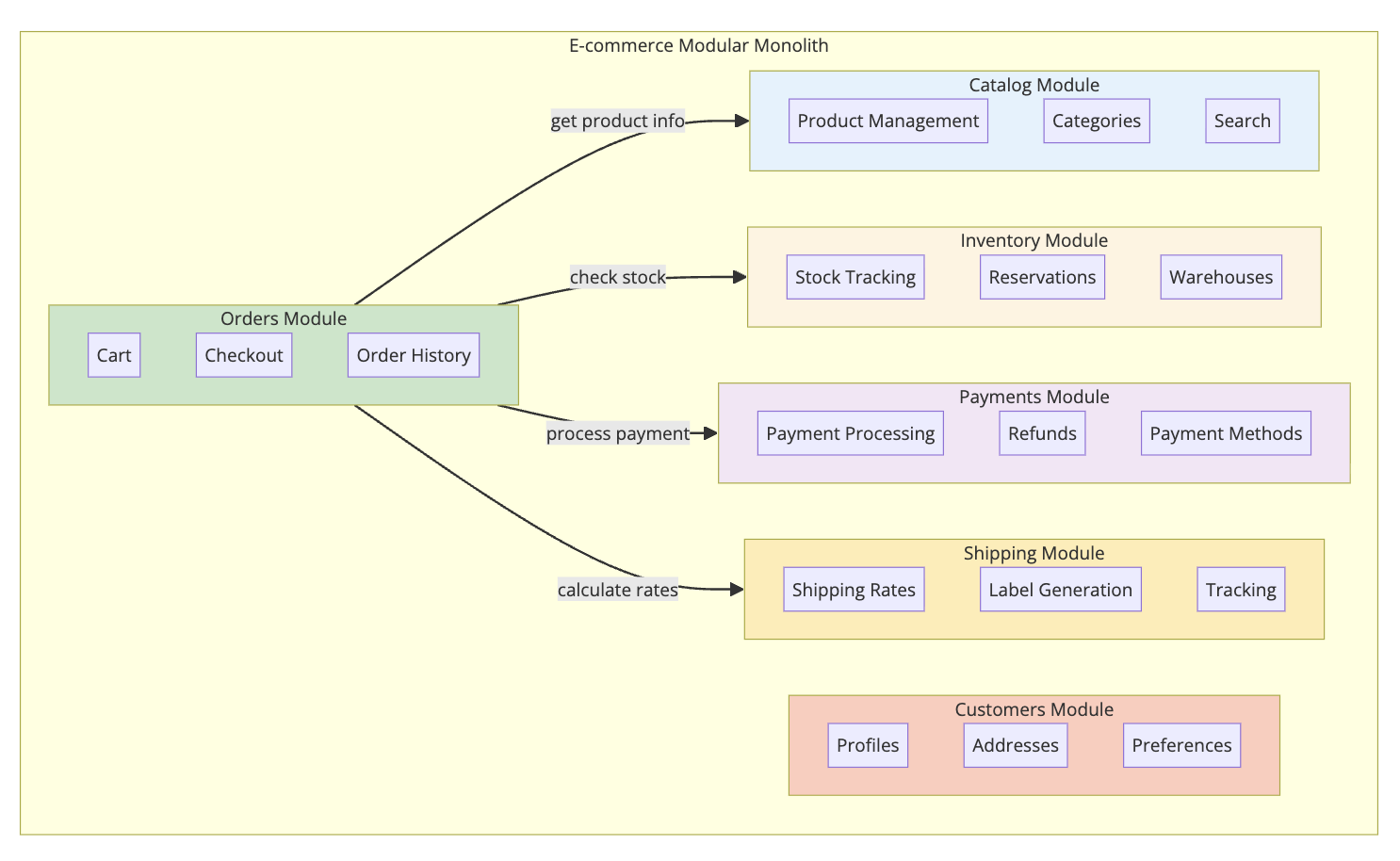
Module Interactions
Here’s how checkout works:
sequenceDiagram
    participant Client
    participant Orders
    participant Catalog
    participant Inventory
    participant Payments
    participant Shipping

    Client->>Orders: checkout(cart)

    Orders->>Catalog: getProducts(productIds)
    Catalog-->>Orders: products with prices

    Orders->>Inventory: reserveItems(items)
    Inventory-->>Orders: reservation confirmed

    Orders->>Shipping: calculateRates(address, items)
    Shipping-->>Orders: shipping options

    Orders->>Orders: create order

    Orders->>Payments: processPayment(order, paymentMethod)
    Payments-->>Orders: payment confirmed

    Orders->>Inventory: confirmReservation(orderId)

    Orders-->>Client: order confirmation

    Note over Orders: Publish OrderCreated event

    Orders->>Shipping: Event: OrderCreated
    Shipping->>Shipping: Generate label
Handling Failures
What if payment fails after inventory is reserved?
1
2
3
4
5
6
7
8
9
10
11
12
13
14
15
16
17
18
19
20
21
22
23
24
25
26
27
28
29
30
31
32
33
34
public class CheckoutService {

    @Transactional
    public Order checkout(Cart cart, PaymentMethod paymentMethod) {
        // 1. Validate and reserve inventory
        Reservation reservation = inventoryFacade.reserve(cart.getItems());

        try {
            // 2. Create order
            Order order = createOrder(cart, reservation);

            // 3. Process payment
            PaymentResult result = paymentFacade.processPayment(
                order.getId(),
                order.getTotal(),
                paymentMethod
            );

            if (!result.isSuccessful()) {
                throw new PaymentFailedException(result.getError());
            }

            // 4. Confirm reservation
            inventoryFacade.confirmReservation(reservation.getId());

            return order;

        } catch (Exception e) {
            // Release reservation on any failure
            inventoryFacade.releaseReservation(reservation.getId());
            throw e;
        }
    }
}
Because everything runs in the same process, you can use database transactions for consistency. Try doing this cleanly with microservices.
Shopify: The Modular Monolith Success Story
Shopify runs one of the largest e-commerce platforms on the planet. During Black Friday 2023, they processed over $9 billion in sales. Their architecture? A modular monolith built with Ruby on Rails.
As I covered in How Shopify Powers 5 Million Stores, they chose this architecture deliberately.
Why Shopify stayed with a modular monolith:
- Team productivity: Developers can work on features without understanding 50 different services
- Deployment simplicity: One artifact to deploy, test, and rollback
- Performance: No network calls between modules means faster response times
- Debugging: Stack traces make sense. No distributed tracing needed.
How they enforce modularity:
- Packwerk: A tool they built to enforce module boundaries in Ruby
- Rails Engines: Each module is a mini-Rails application
- Componentization: Clear public APIs for each module
Their monolith is so large that it has over 2.8 million lines of Ruby code. Yet they deploy it multiple times per day with hundreds of developers.
When to Choose Modular Monolith
Here’s a decision framework:
Choose Modular Monolith When:
| Situation | Why Modular Monolith |
|---|---|
| Team size < 50 developers | Single codebase is manageable |
| Domain isn’t well understood | Easy to refactor boundaries |
| Strong consistency needed | Database transactions work |
| Fast iteration required | No distributed system overhead |
| Limited DevOps capacity | One thing to deploy and monitor |
| Starting a new project | Get boundaries right first |
Choose Microservices When:
| Situation | Why Microservices |
|---|---|
| Team size > 100 developers | Need autonomous teams |
| Different scaling requirements | Scale components independently |
| Different tech stacks needed | Each service can use best tool |
| Strong team boundaries | Ownership is crystal clear |
| High availability requirements | Fault isolation between services |
Key Takeaways
1. Modular monolith is not a compromise. It’s a legitimate architecture choice used by companies processing billions in transactions.
2. Start simple, evolve when needed. You can always extract modules into services later. You can’t easily merge distributed services back together.
3. Boundaries are everything. A modular monolith without enforced boundaries is just a monolith with folders.
4. Single deployment, multiple modules. You get the organizational benefits of separation without the operational cost of distribution.
5. Transaction support is underrated. When you need strong consistency, a single database makes life much easier.
6. The hard part is discipline. The architecture doesn’t prevent you from crossing boundaries. Tests and tooling do.
7. It’s a stepping stone, not a dead end. Well-defined modules can be extracted to services when you actually need it.
Most teams don’t need microservices. They need good architecture. A modular monolith gives you that without the distributed systems tax.
The next time someone suggests microservices for a new project, ask: “What problem are we solving that a modular monolith can’t?”
You might be surprised by the silence.
Building a system that needs to scale? Check out How Shopify Powers 5 Million Stores for a deep dive into their modular monolith, and How Kafka Works when you need event-driven communication between modules.
References: Martin Fowler on Monolith First, Sam Newman on Distributed Monoliths, Shopify Engineering Blog, Kamil Grzybek - Modular Monolith Primer