SSE (Server-Sent Events) enables server-to-client streaming over a single HTTP connection using text/event-stream. Browser’s EventSource API auto-reconnects (default 3000ms retry), sends Last-Event-ID for replay. One-way only (server→client). Use for dashboards, notifications, live scores. Simpler than WebSockets when bidirectional isn’t needed.
You need to push live updates from server to client. Stock prices. Notifications. Live scores. Log streams.
WebSockets feel like overkill. You don’t need bidirectional communication. The client just needs to listen. Long Polling works but feels like a hack. There’s a connection per update cycle, timeouts to manage, reconnection logic to write.
There’s a better option hiding in plain sight: Server-Sent Events.
SSE gives you real-time server push over a single HTTP connection. Built into browsers since 2011. Auto-reconnects when connections drop. Works with your existing HTTP infrastructure. And most developers have never used it.
Let’s fix that.
What Are Server-Sent Events?
Server-Sent Events is a standard that allows servers to push data to browsers over HTTP. Unlike WebSockets, it’s one-way: server to client only. But that’s exactly what you need for most real-time use cases.
The browser opens a connection, and the server keeps it open, sending events whenever it has new data.
sequenceDiagram
    participant Browser
    participant Server

    Browser->>Server: GET /events (Accept: text/event-stream)
    Server-->>Browser: HTTP 200 OK
    Note over Server: Connection stays open

    Server-->>Browser: data: Price update $150.25
    Server-->>Browser: data: Price update $150.30
    Server-->>Browser: data: Price update $150.28

    Note over Browser,Server: Minutes pass...

    Server-->>Browser: data: Price update $151.00

    Note over Browser: Connection drops
    Browser->>Server: GET /events (Last-Event-ID: 42)
    Server-->>Browser: HTTP 200 OK
    Note over Server: Resumes from event 42
The key insight: this is just HTTP. No protocol upgrade. No special ports. Your load balancer, CDN, and monitoring tools all understand it.
The Simplest Implementation
Let’s build a basic SSE system. The simplicity will surprise you.
Server Side (Node.js with Express)
1
2
3
4
5
6
7
8
9
10
11
12
13
14
15
16
17
18
19
20
21
22
23
24
25
26
27
28
29
30
const express = require('express');
const app = express();

app.get('/events', (req, res) => {
    // Set headers for SSE
    res.setHeader('Content-Type', 'text/event-stream');
    res.setHeader('Cache-Control', 'no-cache');
    res.setHeader('Connection', 'keep-alive');

    // Send a comment to prevent connection timeout
    res.write(': connected\n\n');

    // Send an event every 2 seconds
    const intervalId = setInterval(() => {
        const data = {
            time: new Date().toISOString(),
            price: (Math.random() * 100 + 100).toFixed(2)
        };

        res.write(`data: ${JSON.stringify(data)}\n\n`);
    }, 2000);

    // Clean up when client disconnects
    req.on('close', () => {
        clearInterval(intervalId);
        res.end();
    });
});

app.listen(3000);
That’s it. 25 lines for a working real-time server.
Client Side (JavaScript)
1
2
3
4
5
6
7
8
9
10
11
12
13
14
15
16
const eventSource = new EventSource('/events');

eventSource.onmessage = (event) => {
    const data = JSON.parse(event.data);
    console.log('Received:', data);
    updateUI(data);
};

eventSource.onerror = (error) => {
    console.log('Connection error, will auto-reconnect...');
};

// Clean up when leaving page
window.addEventListener('beforeunload', () => {
    eventSource.close();
});
Even simpler. The EventSource API handles connection management, parsing, and automatic reconnection. The browser does the heavy lifting.
The Event Stream Format
SSE uses a simple text-based format. Each message is a block of fields separated by blank lines.
1
2
3
4
5
6
7
8
9
event: priceUpdate
id: 42
retry: 5000
data: {"symbol": "AAPL", "price": 150.25}

event: notification
id: 43
data: {"message": "Market closing in 5 minutes"}
The fields:
| Field | Purpose |
|---|---|
data |
The actual message content. Multiple data lines are joined with newlines |
event |
Event type. Client can listen to specific types |
id |
Event ID. Browser sends this as Last-Event-ID header on reconnect |
retry |
Milliseconds before browser retries after disconnect |
Handling Different Event Types
1
2
3
4
5
6
7
8
9
10
11
12
13
14
15
16
17
18
19
20
21
const eventSource = new EventSource('/events');

// Listen to all events
eventSource.onmessage = (event) => {
    console.log('Generic event:', event.data);
};

// Listen to specific event types
eventSource.addEventListener('priceUpdate', (event) => {
    const data = JSON.parse(event.data);
    updateStockPrice(data.symbol, data.price);
});

eventSource.addEventListener('notification', (event) => {
    const data = JSON.parse(event.data);
    showNotification(data.message);
});

eventSource.addEventListener('heartbeat', (event) => {
    // Just keeping the connection alive
});
Automatic Reconnection: The Killer Feature
The EventSource API automatically reconnects when connections drop. No code needed. But it gets better.
When the browser reconnects, it sends the Last-Event-ID header with the ID of the last received event. Your server can use this to resume the stream without missing events.
1
2
3
4
5
6
7
8
9
10
11
12
13
14
15
16
17
18
19
20
21
22
23
24
25
26
27
28
29
30
31
32
app.get('/events', (req, res) => {
    res.setHeader('Content-Type', 'text/event-stream');
    res.setHeader('Cache-Control', 'no-cache');
    res.setHeader('Connection', 'keep-alive');

    // Check if this is a reconnection
    const lastEventId = req.headers['last-event-id'];

    if (lastEventId) {
        // Send any missed events
        const missedEvents = getEventsSince(parseInt(lastEventId));
        missedEvents.forEach(event => {
            res.write(`id: ${event.id}\n`);
            res.write(`data: ${JSON.stringify(event.data)}\n\n`);
        });
    }

    // Continue with live events...
    let eventId = lastEventId ? parseInt(lastEventId) : 0;

    const intervalId = setInterval(() => {
        eventId++;
        const data = { time: Date.now(), value: Math.random() };

        res.write(`id: ${eventId}\n`);
        res.write(`data: ${JSON.stringify(data)}\n\n`);
    }, 1000);

    req.on('close', () => {
        clearInterval(intervalId);
    });
});
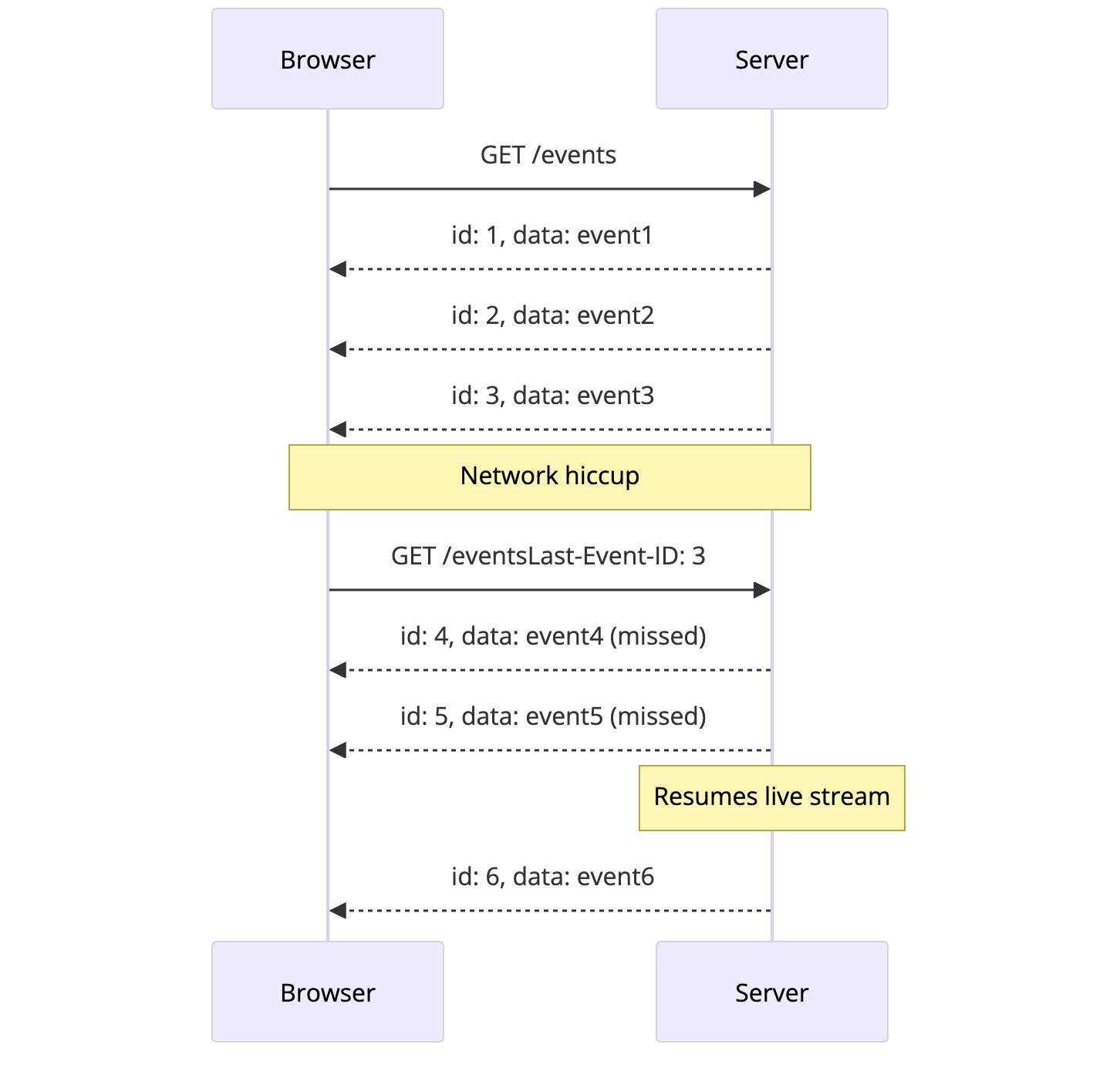
Compare this to WebSockets where you need to implement your own reconnection logic, sequence tracking, and message replay. SSE gives you this for free.
EventSource Default Retry Time: 3000ms
When an SSE connection drops, the browser automatically attempts to reconnect. But how long does it wait?
The default EventSource retry time is 3000 milliseconds (3 seconds).
This is defined in the HTML Living Standard and implemented consistently across browsers. The MDN EventSource documentation confirms this behavior.
Customizing the Retry Interval
Servers can override the default by sending a retry field in the event stream:
1
2
3
4
5
6
7
8
9
10
11
12
13
14
15
app.get('/events', (req, res) => {
    res.setHeader('Content-Type', 'text/event-stream');
    res.setHeader('Cache-Control', 'no-cache');
    res.setHeader('Connection', 'keep-alive');

    // Set custom retry interval to 5 seconds
    res.write('retry: 5000\n\n');

    // Send events...
    const intervalId = setInterval(() => {
        res.write(`data: ${JSON.stringify({ time: Date.now() })}\n\n`);
    }, 1000);

    req.on('close', () => clearInterval(intervalId));
});
| Retry Value | Behavior |
|---|---|
| Not sent | Browser uses default 3000ms |
retry: 1000 |
Reconnect after 1 second |
retry: 5000 |
Reconnect after 5 seconds |
retry: 10000 |
Reconnect after 10 seconds |
retry: 0 |
Reconnect immediately (not recommended) |
Important Notes:
- The
retryfield must be sent as a separate line in the event stream format - The value is in milliseconds
- The browser remembers this value for the duration of the connection
- Setting
retry: 0causes immediate reconnection attempts, which can overwhelm your server
SSE vs WebSockets vs Long Polling
Here’s when to use each:
| Feature | SSE | WebSockets | Long Polling |
|---|---|---|---|
| Direction | Server to client | Bidirectional | Server to client |
| Protocol | HTTP | WebSocket | HTTP |
| Auto-reconnect | Built-in | Manual | Manual |
| Message replay | Built-in (via ID) | Manual | Manual |
| Binary data | No (text only) | Yes | Yes |
| HTTP/2 multiplexing | Yes | No | Yes |
| Browser support | All modern (no IE) | All modern | Universal |
| Proxy/firewall friendly | Yes | Sometimes blocked | Yes |
Choose SSE when:
- Server pushes data, client just listens
- You want automatic reconnection and message replay
- You’re sending text data (JSON, XML)
- HTTP/2 is available (multiplexes multiple SSE streams efficiently)
Choose WebSockets when:
- You need bidirectional communication
- You’re sending binary data
- Message frequency is very high (games, trading)
Choose Long Polling when:
- You need IE support
- SSE is blocked (rare, but happens)
- Serverless functions (no persistent connections)
Real-World Use Cases
1. Live Dashboards
SSE is perfect for dashboards that display real-time metrics.
1
2
3
4
5
6
7
8
9
10
11
12
13
14
15
16
17
18
19
20
21
22
// Server: Stream system metrics
app.get('/metrics', (req, res) => {
    res.setHeader('Content-Type', 'text/event-stream');
    res.setHeader('Cache-Control', 'no-cache');

    const sendMetrics = () => {
        const metrics = {
            cpu: getCpuUsage(),
            memory: getMemoryUsage(),
            requests: getRequestCount(),
            timestamp: Date.now()
        };
        res.write(`event: metrics\n`);
        res.write(`data: ${JSON.stringify(metrics)}\n\n`);
    };

    // Send immediately, then every 5 seconds
    sendMetrics();
    const intervalId = setInterval(sendMetrics, 5000);

    req.on('close', () => clearInterval(intervalId));
});
2. Notifications
Push notifications the moment they happen.
1
2
3
4
5
6
7
8
9
10
11
12
13
14
15
16
17
18
19
20
21
22
// Server: Push notifications from a message queue
const notificationQueue = require('./queue');

app.get('/notifications/:userId', (req, res) => {
    const { userId } = req.params;

    res.setHeader('Content-Type', 'text/event-stream');
    res.setHeader('Cache-Control', 'no-cache');

    // Subscribe to user's notification channel
    const handler = (notification) => {
        res.write(`event: notification\n`);
        res.write(`id: ${notification.id}\n`);
        res.write(`data: ${JSON.stringify(notification)}\n\n`);
    };

    notificationQueue.subscribe(userId, handler);

    req.on('close', () => {
        notificationQueue.unsubscribe(userId, handler);
    });
});
3. Log Streaming
Stream logs to a web-based viewer.
1
2
3
4
5
6
7
8
9
10
11
12
13
14
15
16
17
18
19
20
21
22
const { spawn } = require('child_process');

app.get('/logs/:service', (req, res) => {
    const { service } = req.params;

    res.setHeader('Content-Type', 'text/event-stream');
    res.setHeader('Cache-Control', 'no-cache');

    // Tail the log file
    const tail = spawn('tail', ['-f', `/var/log/${service}.log`]);

    tail.stdout.on('data', (data) => {
        const lines = data.toString().split('\n').filter(Boolean);
        lines.forEach(line => {
            res.write(`data: ${line}\n\n`);
        });
    });

    req.on('close', () => {
        tail.kill();
    });
});
4. Progress Updates
Long-running operations can stream progress.
1
2
3
4
5
6
7
8
9
10
11
12
13
14
15
16
17
18
19
20
21
22
23
24
25
26
27
28
29
30
31
32
33
34
app.post('/upload', upload.single('file'), async (req, res) => {
    const jobId = startProcessingJob(req.file);
    res.json({ jobId });
});

app.get('/progress/:jobId', (req, res) => {
    const { jobId } = req.params;

    res.setHeader('Content-Type', 'text/event-stream');
    res.setHeader('Cache-Control', 'no-cache');

    const job = getJob(jobId);

    const sendProgress = () => {
        const status = job.getStatus();
        res.write(`data: ${JSON.stringify(status)}\n\n`);

        if (status.complete) {
            res.write(`event: complete\n`);
            res.write(`data: ${JSON.stringify(status.result)}\n\n`);
            res.end();
        }
    };

    // Poll job status and push updates
    const intervalId = setInterval(sendProgress, 500);

    job.on('progress', sendProgress);
    job.on('complete', () => {
        clearInterval(intervalId);
    });

    req.on('close', () => clearInterval(intervalId));
});
Scaling SSE Connections
A single server can handle thousands of SSE connections. But as you scale horizontally, you face the same challenge as Long Polling: events might arrive at a server that doesn’t have the interested client.
Using Redis Pub/Sub
flowchart TD
    subgraph Clients
        C1[Browser 1]
        C2[Browser 2]
        C3[Browser 3]
    end

    subgraph Servers
        S1[Server 1]
        S2[Server 2]
    end

    R[(Redis Pub/Sub)]
    E[Event Producer]

    C1 --> S1
    C2 --> S1
    C3 --> S2

    S1 <--> R
    S2 <--> R
    E --> R

    style R fill:#fee2e2,stroke:#dc2626,stroke-width:2px
    style E fill:#dcfce7,stroke:#16a34a,stroke-width:2px
1
2
3
4
5
6
7
8
9
10
11
12
13
14
15
16
17
18
19
20
21
22
23
24
25
26
27
28
29
30
31
32
33
34
35
36
37
38
39
40
41
42
43
const Redis = require('ioredis');
const sub = new Redis();
const pub = new Redis();

// Subscribe to Redis channel
sub.subscribe('events');

// Store active SSE connections
const clients = new Map();

sub.on('message', (channel, message) => {
    const event = JSON.parse(message);

    // Broadcast to all connected clients interested in this event
    clients.forEach((res, clientId) => {
        if (shouldReceive(clientId, event)) {
            res.write(`id: ${event.id}\n`);
            res.write(`event: ${event.type}\n`);
            res.write(`data: ${JSON.stringify(event.data)}\n\n`);
        }
    });
});

app.get('/events', (req, res) => {
    res.setHeader('Content-Type', 'text/event-stream');
    res.setHeader('Cache-Control', 'no-cache');

    const clientId = generateId();
    clients.set(clientId, res);

    req.on('close', () => {
        clients.delete(clientId);
    });
});

// Any service can publish events
function publishEvent(type, data) {
    pub.publish('events', JSON.stringify({
        id: generateEventId(),
        type,
        data
    }));
}
Common Pitfalls and Solutions
Pitfall 1: Proxy Buffering
Some reverse proxies buffer responses, breaking SSE. Nginx, for example, buffers by default.
Fix: Disable buffering in your proxy config:
1
2
3
4
5
6
7
8
location /events {
    proxy_pass http://backend;
    proxy_http_version 1.1;
    proxy_set_header Connection '';
    proxy_buffering off;
    proxy_cache off;
    chunked_transfer_encoding off;
}
Pitfall 2: Connection Limits
Browsers limit connections per domain (usually 6). If you open multiple SSE connections to the same domain, you’ll block other requests.
Fix: Use HTTP/2 (multiplexes all streams over one connection) or consolidate into a single SSE connection:
1
2
3
4
5
6
7
8
9
10
// Instead of multiple connections
const prices = new EventSource('/prices');
const notifications = new EventSource('/notifications');
const alerts = new EventSource('/alerts');

// Use one connection with event types
const events = new EventSource('/events');
events.addEventListener('price', handlePrice);
events.addEventListener('notification', handleNotification);
events.addEventListener('alert', handleAlert);
Pitfall 3: Missing Keep-Alive
If no events are sent for a while, proxies may close the connection.
Fix: Send periodic comments (lines starting with :) as heartbeats:
1
2
3
4
5
6
7
const heartbeatInterval = setInterval(() => {
    res.write(': heartbeat\n\n');
}, 30000);

req.on('close', () => {
    clearInterval(heartbeatInterval);
});
Pitfall 4: Not Handling Reconnection State
When clients reconnect, they might miss events or receive duplicates.
Fix: Use event IDs and implement proper replay:
1
2
3
4
5
6
7
8
9
10
11
12
13
14
15
16
17
18
19
20
21
22
23
24
// Store recent events for replay
const recentEvents = [];
const MAX_EVENTS = 1000;

function addEvent(event) {
    recentEvents.push(event);
    if (recentEvents.length > MAX_EVENTS) {
        recentEvents.shift();
    }
}

app.get('/events', (req, res) => {
    const lastEventId = parseInt(req.headers['last-event-id']) || 0;

    // Replay missed events
    recentEvents
        .filter(e => e.id > lastEventId)
        .forEach(e => {
            res.write(`id: ${e.id}\n`);
            res.write(`data: ${JSON.stringify(e.data)}\n\n`);
        });

    // Continue with live events...
});
Pitfall 5: Memory Leaks
Forgetting to clean up when clients disconnect.
Fix: Always handle the close event:
1
2
3
4
5
6
7
8
9
10
11
12
app.get('/events', (req, res) => {
    const intervalId = setInterval(sendData, 1000);
    const subscription = pubsub.subscribe(channel, handler);

    // Always clean up
    req.on('close', () => {
        clearInterval(intervalId);
        pubsub.unsubscribe(subscription);
        // Remove from any tracking structures
        clients.delete(clientId);
    });
});
Performance Numbers
| Metric | Typical Value |
|---|---|
| Connections per server | 10,000 to 100,000 |
| Memory per connection | 2KB to 5KB |
| Message overhead | ~10 bytes (vs 400+ for HTTP) |
| Reconnection time | 3 seconds (configurable) |
| Browser support | 97%+ (caniuse.com) |
SSE performs comparably to WebSockets for server-to-client streaming, with the advantage of working over standard HTTP infrastructure.
When SSE Falls Short
SSE isn’t perfect. Here’s when to look elsewhere:
Binary data: SSE only supports UTF-8 text. For binary data, use WebSockets or encode as Base64 (inefficient).
Bidirectional: If clients need to send frequent messages back, use WebSockets. You can combine SSE for server push with regular HTTP requests for client messages, but it’s awkward at scale.
Old browsers: Internet Explorer never supported SSE. If you need IE support, use a polyfill or Long Polling.
Serverless: AWS Lambda, Cloud Functions, and similar platforms timeout after seconds to minutes. SSE needs long-lived connections. Use Long Polling or WebSocket services like AWS API Gateway WebSockets.
Key Takeaways
1. SSE is HTTP streaming. No protocol upgrade, no special ports. Works with your existing infrastructure.
2. Auto-reconnection is built in. The browser handles reconnection and sends Last-Event-ID for replay. You get this for free.
3. Use event IDs. They enable reliable message delivery across reconnections.
4. One connection is enough. Use event types to multiplex different data streams over a single connection.
5. Watch for proxy buffering. This is the most common deployment issue. Disable buffering in Nginx, HAProxy, or whatever sits in front of your servers.
6. SSE shines for dashboards, notifications, and feeds. Anything where the server pushes and the client listens.
Server-Sent Events won’t replace WebSockets for chat apps or multiplayer games. But for the majority of real-time use cases where data flows one way, SSE offers the simplicity of HTTP with the responsiveness of persistent connections.
Sometimes the right tool is the one that’s been there all along.
Building real-time systems? Check out Long Polling Explained for the fallback option, How Google Docs Works for collaborative editing at scale, and How Stock Brokers Handle Real-Time Price Updates to see how financial systems push millions of updates per second.
References: MDN EventSource, HTML Living Standard, Can I Use SSE