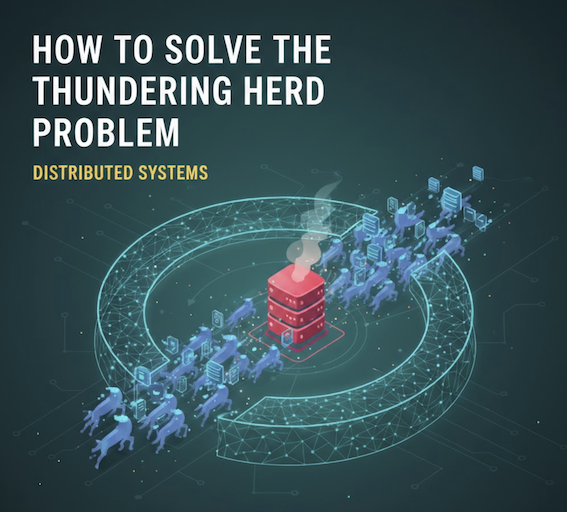
Message queues decouple services, absorb traffic spikes, and enable async processing. Kafka: high-throughput streaming with replay. RabbitMQ: complex routing and request-reply. SQS: simple AWS-native. Dead letter queues store failed messages for debugging. Pub/sub broadcasts to all subscribers; point-to-point delivers to one consumer.
Your checkout page just went viral on Twitter. Orders are flooding in. The payment service is getting hammered. Database connections are maxing out. Your monitoring dashboard is screaming red.
This is the moment when most systems break. But well designed systems? They stay calm. They use queues.
Message queues are one of those patterns that separate systems that scale from systems that crash. Yet many developers treat queues as an afterthought. They bolt them on when things start breaking.
Let’s fix that. By the end of this post, you’ll understand exactly when to use queues, which queue technology to pick, and how companies like Uber, Slack, and Stripe use them to handle millions of requests.
The Problem: Tight Coupling Breaks Systems
Picture a simple e-commerce checkout flow:
sequenceDiagram
    participant User
    participant API as Checkout API
    participant Payment as Payment Service
    participant Inventory as Inventory Service
    participant Email as Email Service
    participant Analytics as Analytics

    User->>API: Place Order
    API->>Payment: Charge Card
    Payment->>API: Success
    API->>Inventory: Reserve Items
    Inventory->>API: Reserved
    API->>Email: Send Confirmation
    Email->>API: Sent
    API->>Analytics: Log Purchase
    Analytics->>API: Logged
    API->>User: Order Complete (2.3s total)
This works fine with 10 users. But what happens at scale?
Problem 1: Latency adds up. Each service call takes 200-500ms. Chain four services together and your checkout takes 2+ seconds. Users abandon carts.
Problem 2: One slow service blocks everything. If the email service takes 3 seconds because of a spam filter check, your entire checkout waits 3 seconds.
Problem 3: One failing service kills the whole flow. Analytics service is down? Checkout fails. Even though analytics isn’t critical to completing an order.
Problem 4: No way to handle traffic spikes. Black Friday hits, orders spike 10x. All your downstream services must handle 10x load simultaneously. If any one of them can’t, the whole system falls over.
This is what we call tight coupling. Every component depends on every other component being fast and available.
The Solution: Decouple with Queues
A queue sits between services. Instead of calling services directly, you drop a message on the queue. The service picks it up when it’s ready.
sequenceDiagram
    participant User
    participant API as Checkout API
    participant Payment as Payment Service
    participant Queue as Message Queue
    participant Inventory as Inventory Worker
    participant Email as Email Worker
    participant Analytics as Analytics Worker

    User->>API: Place Order
    API->>Payment: Charge Card
    Payment->>API: Success
    API->>Queue: Publish "OrderCreated"
    API->>User: Order Complete (400ms)

    Note over Queue,Analytics: Async Processing
    Queue->>Inventory: Process reservation
    Queue->>Email: Send confirmation
    Queue->>Analytics: Log purchase
Now your checkout is fast. The user gets a response in 400ms instead of 2.3 seconds. Everything else happens in the background.
Benefit 1: Faster responses. Only critical operations block the user. Everything else is async.
Benefit 2: Fault isolation. Email service down? Messages pile up in the queue. When it recovers, it processes the backlog. Users never notice.
Benefit 3: Traffic smoothing. A sudden spike of 10,000 orders doesn’t hit your services all at once. The queue absorbs the burst, and workers process at their own pace. This is one of the most effective ways to prevent the thundering herd problem in write heavy systems.
Benefit 4: Independent scaling. Your email worker is slow? Add more email workers. No need to scale the entire system.
Core Concepts Every Developer Should Know
Producers and Consumers
The two actors in any queue system:
- Producer: Creates messages and puts them on the queue
- Consumer: Reads messages from the queue and processes them
graph LR
    subgraph Producers
        P1[Order Service]
        P2[User Service]
        P3[Payment Service]
    end

    Q[(Message Queue)]

    subgraph Consumers
        C1[Email Worker]
        C2[Analytics Worker]
        C3[Notification Worker]
    end

    P1 --> Q
    P2 --> Q
    P3 --> Q
    Q --> C1
    Q --> C2
    Q --> C3

    style Q fill:#4a90a4
This pattern is called producer-consumer or point-to-point messaging. One producer sends a message, one consumer receives it.
Publish-Subscribe (Pub/Sub)
Sometimes multiple consumers need the same message. This is where pub/sub comes in.
graph TB
    P[Order Service<br/>Publisher]

    subgraph "Topic: order.created"
        T[Topic/Exchange]
    end

    subgraph Subscribers
        S1[Inventory Service]
        S2[Email Service]
        S3[Analytics Service]
        S4[Fraud Detection]
    end

    P --> T
    T --> S1
    T --> S2
    T --> S3
    T --> S4

    style T fill:#5fb878
With pub/sub:
- Publisher doesn’t know (or care) about subscribers
- Each subscriber gets its own copy of the message
- Adding new subscribers requires no changes to the publisher
This is how event-driven architectures work. Services publish events about what happened. Other services subscribe to events they care about.
Message Acknowledgment
What happens when a consumer crashes mid-processing? Without proper acknowledgment, you either:
- Lose the message forever (bad for payments)
- Process it twice (bad for charges)
Queues solve this with acknowledgments (acks):
sequenceDiagram
    participant Queue
    participant Consumer

    Queue->>Consumer: Deliver message
    Note over Consumer: Processing...

    alt Success
        Consumer->>Queue: ACK (done, remove message)
        Queue->>Queue: Delete message
    else Failure
        Consumer->>Queue: NACK (failed, retry)
        Queue->>Queue: Keep message, redeliver
    end
The message stays in the queue until the consumer explicitly acknowledges it. If the consumer crashes, the queue assumes failure and redelivers to another consumer.
Dead Letter Queues (DLQ)
What if a message keeps failing? Maybe it’s malformed. Maybe it triggers a bug. You don’t want it blocking other messages forever.
Enter the Dead Letter Queue:
graph LR
    subgraph "Main Flow"
        Q[Main Queue] --> C[Consumer]
    end

    subgraph "After N retries"
        C -->|"Failed 3x"| DLQ[Dead Letter Queue]
    end

    subgraph "Manual Review"
        DLQ --> Alert[Alert Team]
        DLQ --> Dashboard[Admin Dashboard]
    end

    style DLQ fill:#f5a623
After a configurable number of retries, the message moves to the DLQ. This keeps your main queue healthy while preserving problematic messages for investigation.
Real story: A payment processor had a bug where certain currency codes caused JSON parsing to fail. Without a DLQ, those messages would retry forever. With a DLQ, they caught the issue, fixed the bug, and replayed the messages from the DLQ.
Popular Queue Technologies Compared
RabbitMQ
Best for: Traditional message queuing, complex routing, enterprise integration
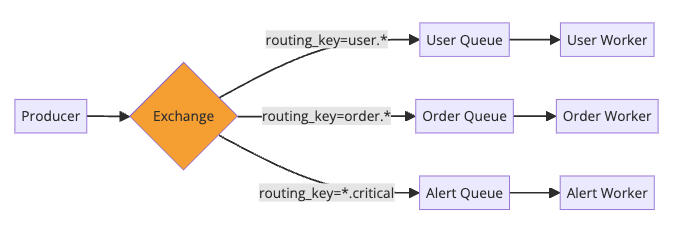
RabbitMQ implements the AMQP protocol. It’s great when you need sophisticated routing:
Pros:
- Flexible routing with exchanges (direct, topic, fanout, headers)
- Built-in management UI
- Supports multiple protocols (AMQP, MQTT, STOMP)
- Low latency for small messages
Cons:
- Not designed for high throughput log streaming
- Messages are deleted after consumption (not replayable)
- Scaling beyond single cluster is tricky
Use RabbitMQ when: You need complex routing rules, request-reply patterns, or traditional work queue semantics.
Apache Kafka
Best for: High throughput streaming, event sourcing, log aggregation
Kafka isn’t a traditional queue. It’s a distributed commit log. Messages persist and can be replayed.
graph TB
    subgraph "Kafka Topic: orders"
        P0[Partition 0<br/>Offset: 0,1,2,3...]
        P1[Partition 1<br/>Offset: 0,1,2,3...]
        P2[Partition 2<br/>Offset: 0,1,2,3...]
    end

    subgraph "Consumer Group: analytics"
        C1[Consumer 1] --> P0
        C2[Consumer 2] --> P1
        C3[Consumer 3] --> P2
    end

    subgraph "Consumer Group: email"
        C4[Consumer 4] --> P0
        C4 --> P1
        C4 --> P2
    end

    style P0 fill:#e3f2fd
    style P1 fill:#e8f5e9
    style P2 fill:#fff3e0
Pros:
- Incredible throughput (millions of messages/second)
- Messages persist for days/weeks (replayable)
- Multiple consumer groups can read independently
- Ordering guaranteed within partition
Cons:
- Higher latency than RabbitMQ (batching)
- Complex to operate (ZooKeeper dependency, though KRaft mode helps)
- Overkill for simple use cases
Use Kafka when: You need high throughput, event sourcing, stream processing, or multiple teams consuming the same events.
For a deeper dive, check out How Kafka Works.
Amazon SQS
Best for: Simple queuing on AWS, serverless architectures
SQS is a fully managed queue. Zero infrastructure to manage.
graph LR
    subgraph "AWS"
        Lambda1[Lambda: Order Handler]
        SQS[(SQS Queue)]
        Lambda2[Lambda: Email Sender]
    end

    Lambda1 -->|"SendMessage"| SQS
    SQS -->|"Trigger"| Lambda2

    style SQS fill:#ff9900
Two flavors:
- Standard: Nearly unlimited throughput, at-least-once delivery, best-effort ordering
- FIFO: Exactly-once delivery, strict ordering, but limited to 3,000 messages/second
Pros:
- Zero ops (AWS manages everything)
- Pay per use (no idle costs)
- Native integration with Lambda, SNS, S3
- 14-day message retention
Cons:
- AWS vendor lock-in
- Standard queues don’t guarantee order
- Maximum message size of 256KB
Use SQS when: You’re on AWS and want zero ops, or building serverless with Lambda.
Redis (as a Queue)
Best for: Simple queues, real-time features, when you already have Redis
Redis isn’t a dedicated queue, but Redis Streams provides queue-like functionality.
1
2
3
4
5
6
7
8
# Producer
redis.xadd('orders', {'order_id': '12345', 'amount': '99.99'})

# Consumer
messages = redis.xread({'orders': '0'}, block=5000)
for message in messages:
    process(message)
    redis.xack('orders', 'worker-group', message['id'])
Pros:
- Sub-millisecond latency
- Already in your stack (probably)
- Simple to set up
Cons:
- Limited durability (depends on persistence config)
- No sophisticated routing
- Scaling is harder than dedicated systems
Use Redis when: You need simple, fast queuing and Redis is already in your infrastructure.
Real-World Patterns
Pattern 1: Work Queue (Task Distribution)
Distribute work across multiple workers. Classic use case: image processing.
graph LR
    API[Upload API] -->|"Process image 123"| Q[(Image Queue)]

    Q --> W1[Worker 1<br/>Resize]
    Q --> W2[Worker 2<br/>Resize]
    Q --> W3[Worker 3<br/>Resize]

    W1 --> S3[(S3: Processed)]
    W2 --> S3
    W3 --> S3

    style Q fill:#4a90a4
How Slack does it: When you upload an image, Slack’s API drops a message on a queue. Worker pools pick up messages and generate thumbnails, previews, and virus-scanned copies. The chat UI shows a placeholder until processing completes.
Implementation tips:
- Set visibility timeout longer than processing time
- Use message deduplication to handle retries
- Monitor queue depth to auto-scale workers
Pattern 2: Event-Driven Microservices
Services communicate through events, not direct calls.
graph LR
    subgraph Publishers
        Order[Order Service]
    end

    Order -->|OrderCreated| EB

    EB[(Event Bus)]

    EB --> Payment[Payment Service]
    EB --> Inventory[Inventory Service]
    EB --> Shipping[Shipping Service]
    EB --> Notification[Notification Service]

    style EB fill:#5fb878
    style Order fill:#e3f2fd
Each service publishes events about what happened. Other services subscribe to events they care about:
graph LR
    subgraph "Event Flow"
        E1[OrderCreated] --> EB[(Event Bus)]
        E2[PaymentCompleted] --> EB
        E3[ItemsReserved] --> EB
        E4[OrderShipped] --> EB
    end

    style EB fill:#5fb878
    style E1 fill:#e3f2fd
    style E2 fill:#e8f5e9
    style E3 fill:#fff3e0
    style E4 fill:#fce4ec
How Uber works: When you request a ride, the Ride Service publishes a “RideRequested” event. The Matching Service subscribes and finds drivers. The Notification Service subscribes and sends push notifications. The Pricing Service subscribes and locks the fare. Each service is independent.
Benefits:
- Services are loosely coupled
- Easy to add new features (just subscribe to existing events)
- Clear audit trail of what happened
Pattern 3: Request Buffering (Traffic Smoothing)
Protect your database from traffic spikes.
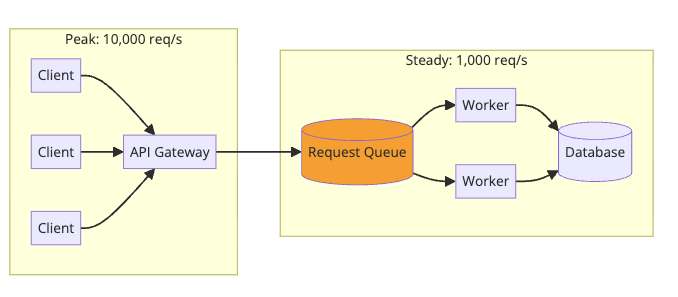
Your database can handle 1,000 writes/second. Black Friday brings 10,000/second. Instead of crashing, the queue absorbs the spike. Workers process at a sustainable rate. Some operations are delayed, but nothing fails.
How Stripe handles webhooks: Your webhook endpoint might be slow or down. Stripe queues webhook events and retries with exponential backoff over 72 hours. Your temporary outage doesn’t mean lost payment notifications.
Pattern 4: Saga Pattern for Distributed Transactions
Need to coordinate actions across services with rollback? Use event choreography.
sequenceDiagram
    participant Order as Order Service
    participant Queue as Event Queue
    participant Payment as Payment Service
    participant Inventory as Inventory Service

    Order->>Queue: OrderCreated
    Queue->>Payment: Process payment

    alt Payment Success
        Payment->>Queue: PaymentCompleted
        Queue->>Inventory: Reserve items

        alt Reservation Success
            Inventory->>Queue: ItemsReserved
            Queue->>Order: Saga Complete
        else Reservation Failed
            Inventory->>Queue: ReservationFailed
            Queue->>Payment: Refund Payment
            Queue->>Order: Saga Failed
        end
    else Payment Failed
        Payment->>Queue: PaymentFailed
        Queue->>Order: Saga Failed
    end
Each service handles its step and publishes the result. If any step fails, compensating actions run to undo previous steps.
For more on this pattern, see Two-Phase Commit.
Pattern 5: CQRS with Event Sourcing
Separate read and write models using events.
graph LR
    subgraph Write
        CMD[Commands] --> WS[Write Service]
        WS --> ES[(Event Store)]
    end

    ES --> Q[(Queue)]

    subgraph Read
        Q --> P1[Search Projector]
        Q --> P2[Analytics Projector]
        Q --> P3[Cache Projector]
    end

    style Q fill:#4a90a4
    style ES fill:#e8f5e9
Events flow through the queue to multiple projectors. Each projector builds an optimized read model for its use case.
Learn more about this in CQRS Design Pattern.
Practical Implementation: Order Processing
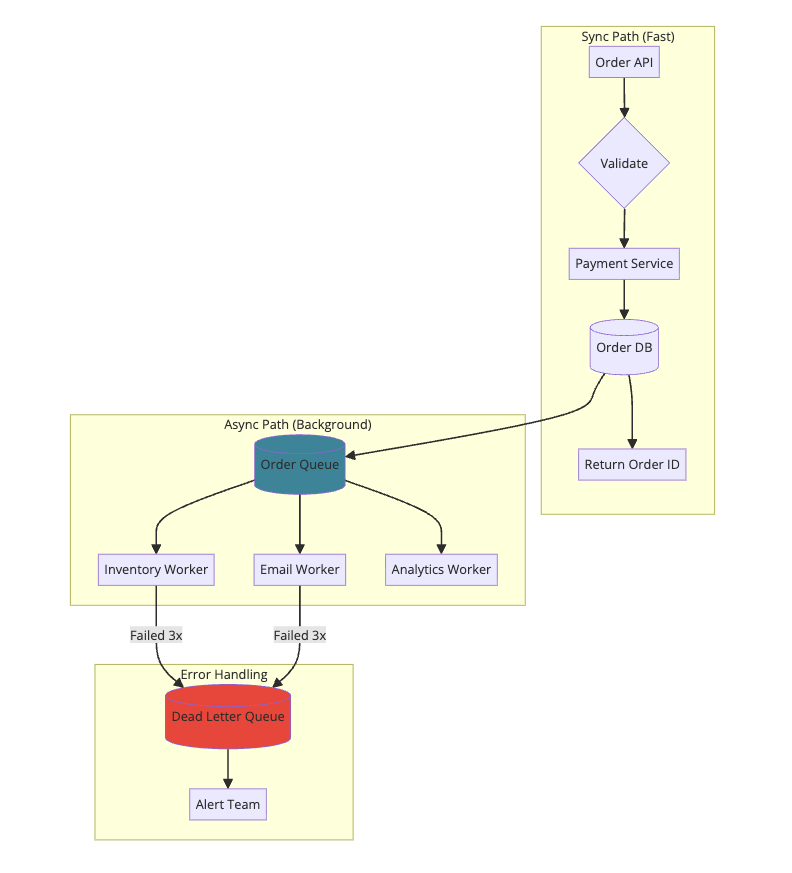
Let’s build a simple order processing system with proper queue patterns.
Architecture:
Producer (Order API):
1
2
3
4
5
6
7
8
9
10
11
12
13
14
15
16
17
18
19
20
21
22
23
24
25
26
27
28
29
30
31
32
33
34
35
36
37
import json
import boto3

sqs = boto3.client('sqs')
QUEUE_URL = 'https://sqs.us-east-1.amazonaws.com/123456789/order-events'

def create_order(order_data):
    # Sync: Validate and charge
    validate_order(order_data)
    payment_result = charge_payment(order_data)

    # Sync: Save to database
    order = save_order(order_data, payment_result)

    # Async: Publish event for background processing
    event = {
        'event_type': 'OrderCreated',
        'order_id': order.id,
        'user_id': order.user_id,
        'items': order.items,
        'total': order.total,
        'timestamp': datetime.utcnow().isoformat()
    }

    sqs.send_message(
        QueueUrl=QUEUE_URL,
        MessageBody=json.dumps(event),
        MessageAttributes={
            'EventType': {
                'DataType': 'String',
                'StringValue': 'OrderCreated'
            }
        }
    )

    # Return immediately, don't wait for email/inventory
    return {'order_id': order.id, 'status': 'processing'}
Consumer (Email Worker):
1
2
3
4
5
6
7
8
9
10
11
12
13
14
15
16
17
18
19
20
21
22
23
24
25
26
27
28
29
30
31
32
33
34
35
36
37
38
39
40
41
42
43
44
45
46
47
48
49
50
51
52
53
54
55
56
57
58
59
60
61
62
63
64
65
import json
import boto3

sqs = boto3.client('sqs')
QUEUE_URL = 'https://sqs.us-east-1.amazonaws.com/123456789/order-events'
DLQ_URL = 'https://sqs.us-east-1.amazonaws.com/123456789/order-events-dlq'

def process_messages():
    while True:
        response = sqs.receive_message(
            QueueUrl=QUEUE_URL,
            MaxNumberOfMessages=10,
            WaitTimeSeconds=20,  # Long polling
            MessageAttributeNames=['All']
        )

        for message in response.get('Messages', []):
            try:
                event = json.loads(message['Body'])

                # Check if already processed (idempotency)
                if is_processed(event['order_id']):
                    delete_message(message)
                    continue

                # Process the event
                send_order_confirmation_email(event)
                mark_processed(event['order_id'])

                # Acknowledge success
                delete_message(message)

            except Exception as e:
                handle_failure(message, e)

def handle_failure(message, error):
    receive_count = int(message.get('ApproximateReceiveCount', 0))

    if receive_count >= 3:
        # Move to DLQ after 3 retries
        sqs.send_message(
            QueueUrl=DLQ_URL,
            MessageBody=message['Body'],
            MessageAttributes={
                'Error': {
                    'DataType': 'String',
                    'StringValue': str(error)
                },
                'OriginalMessageId': {
                    'DataType': 'String',
                    'StringValue': message['MessageId']
                }
            }
        )
        delete_message(message)
        alert_team(f"Message moved to DLQ: {error}")
    else:
        # Let visibility timeout expire for automatic retry
        log_error(f"Processing failed, will retry: {error}")

def delete_message(message):
    sqs.delete_message(
        QueueUrl=QUEUE_URL,
        ReceiptHandle=message['ReceiptHandle']
    )
Key Takeaways
-
Queues decouple services. The producer doesn’t wait for the consumer. They scale independently.
-
Use queues for the right reasons: async processing, traffic smoothing, fault isolation, and fan-out messaging.
-
Make consumers idempotent. Messages will be delivered twice. Handle it gracefully.
-
Always have a DLQ. Poison messages shouldn’t block your queue forever.
- Choose the right tool:
- High throughput/replay: Kafka
- Complex routing: RabbitMQ
- Serverless/AWS: SQS
- Simple/fast: Redis Streams
-
Monitor queue depth. If it keeps growing, you have a problem.
- Don’t over-engineer. Start without queues. Add them when you need async processing or are hitting scalability limits.
Want to learn more about distributed systems patterns? Check out the System Design Cheat Sheet for a complete reference, How Kafka Works for log-based messaging, Two-Phase Commit for distributed transactions, and How Stripe Prevents Double Payment for idempotency patterns.
Further Reading: